“I love the efficiency of auto-filling the invoice information and pricing, including attachment adding - Review, tweak, and close. Done! It’s so fast!”
Context
Fleet maintenance teams often rely on outside vendors for sublet work: repairs, parts, labor, and services completed outside the internal shop. Those invoices matter because they contain the real cost and repair history of an asset, but they often arrive as PDFs, scans, JPGs, or PNGs instead of structured data.
If those details are not entered into Fleet360 as work orders, the organization loses visibility into maintenance history, true asset costs, budgeting, and replacement timing. The invoice may exist as an attachment, but the operational data stays trapped in a document.
Sublet Invoice Capture was designed to change that. The goal was not to bolt AI onto the product for novelty. It was to compress a repetitive workflow and turn messy vendor documents into usable fleet maintenance records, while keeping users in control of what gets saved.
Problem
- Manual sublet invoice entry was slow and easy to defer when maintenance teams had more urgent work in front of them.
- Invoice details were trapped in PDFs or scans instead of becoming structured work-order, cost, and asset-history data.
- Missing sublet work created gaps in asset records, reporting, and lifecycle-cost analysis.
- AI extraction alone would not be trustworthy unless users could review, correct, and approve the output before it entered Fleet360.
- The workflow needed to improve speed without weakening data quality or user confidence.
Constraints
- Vendor invoice formats vary widely across fleets, shops, and repair categories.
- Incorrect asset, vendor, part, labor, or cost data can damage reporting and long-term maintenance history.
- Fleet teams need fast operational tools, not novelty AI experiences that create extra review work.
- The feature had to fit established Fleet360 work-order patterns and data relationships.
- The review state needed to feel like a useful trust layer, not a speed bump.
Research Findings
The core finding was that users were not avoiding sublet data entry because they did not care about the records. They were working in an environment where the task competed with immediate operational demands.
Three findings shaped the design:
- The real value was not just reading text from a document. It was transforming outside work into complete, usable fleet data.
- Users needed to understand what the system extracted, what it matched, and what still needed attention before saving.
- Confidence depended on human approval. No AI-generated data should enter the system until the user had reviewed and accepted it.
That pushed the design toward a human-in-the-loop workflow: AI could do the tedious extraction and organization, but the user stayed responsible for verification and final save.
Key Decisions
1. Make upload the start of a structured workflow
Uploading an invoice could not behave like basic file storage. The document needed to become the source for creating or updating a work order, attaching the original invoice, and connecting the record to the correct asset.
That decision changed the feature from “store this invoice” to “turn this invoice into maintenance history.”
2. Keep the human as final approver
The system reads, extracts, matches, and organizes invoice data, but the user decides what enters Fleet360. Before anything is saved, the review step gives users a chance to verify extracted details, make corrections inline, and confirm the final record.
This was the trust model: AI accelerates the work, but the user remains the accountable operator.
3. Design review around warnings and corrections
The review screen had to do more than display fields. It needed to call attention to errors, warnings, uncertain matches, and editable values so the user could move quickly without missing the details that matter.
Inline correction became a central part of the experience because it keeps review in the flow instead of forcing users into a separate cleanup mode.
4. Tie the output to asset history and decision-making
The downstream value is complete fleet data: work-order history, outside repair costs, asset lifecycle visibility, budgeting, and replacement timing.
That meant the design had to keep the user’s attention on more than invoice processing speed. The workflow needed to show that every captured invoice improves the long-term picture of asset performance and cost.
5. Position AI as operational compression
The feature works because the AI layer compresses form work, document reading, and manual reconciliation into a shorter review-and-approve flow. It does not ask fleet teams to learn a new AI workspace or chat with a separate assistant.
In this context, the best AI interaction feels like a faster, more reliable path through the work users already need to complete.
System / Workflow / Experience Design
Upload
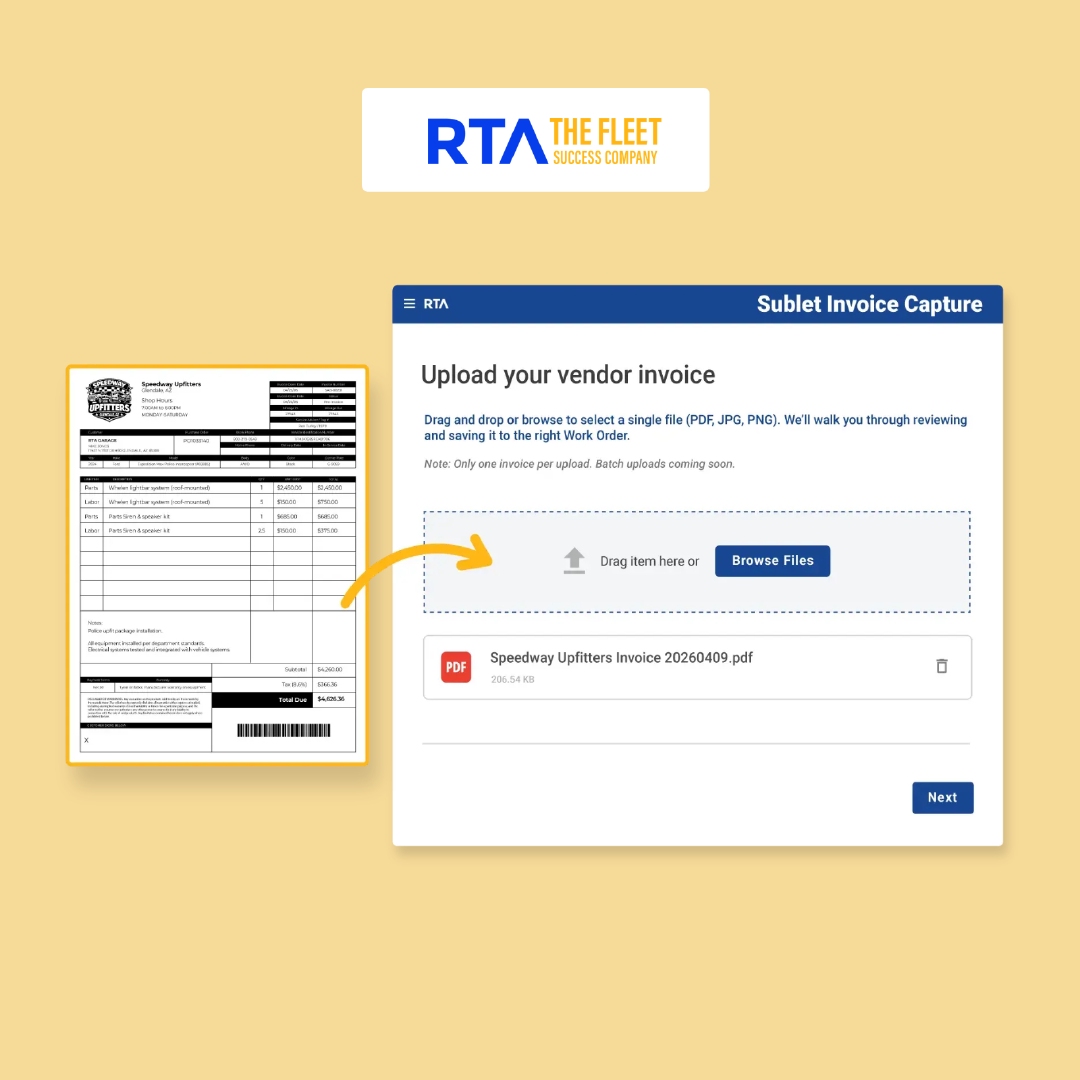
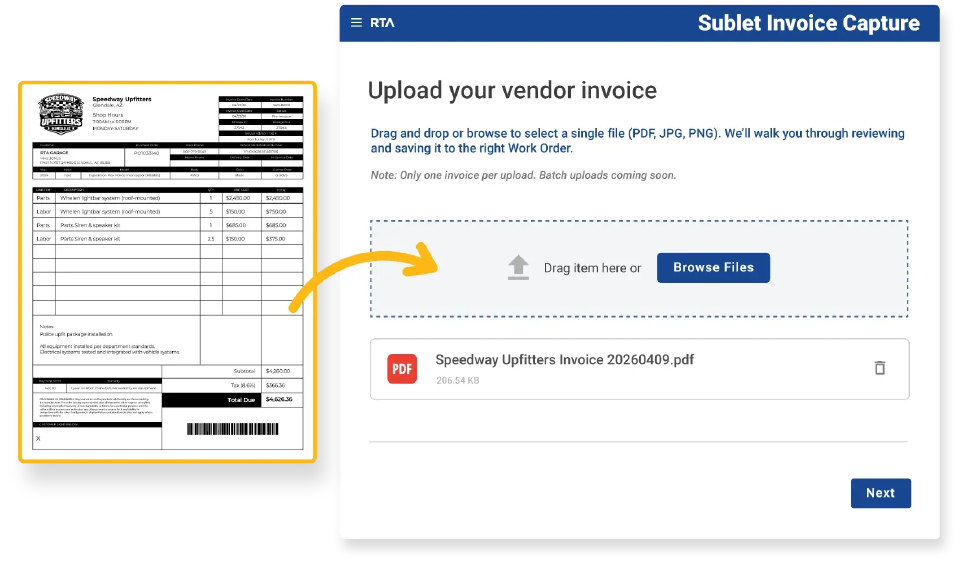
The user uploads a vendor invoice file. The system reads the document and extracts the information needed to prepare a work order: vendor, asset, parts, labor, costs, and supporting invoice details.
This shifts the initial interaction from manual data entry to intent: “process this invoice.”
Review
Once uploaded, invoice data is organized into a structured format and prepared as a work order tied to the correct asset. Fleet360 scans for matching assets and open work orders, then prepares the appropriate create-or-update path.
Before creating or updating a work order, the feature flags errors and warnings. The user can review extracted fields, make quick corrections, resolve matching issues, and confirm changes before saving.
Save
After approval, Fleet360 creates or updates the work order, attaches the invoice, and connects the record to the asset history. The invoice stops being a detached document and becomes part of the operational record.
That last step is what makes the workflow matter beyond time savings. It closes the loop between outside repair work, maintenance history, reporting accuracy, and future decision-making.
Validation / Rollout
RTA launched Sublet Invoice Capture publicly as an AI-enabled Fleet360 feature, positioning it around reduced manual entry, improved reporting accuracy, and better decision-making.
The public launch page also surfaced customer feedback from fleets using the feature:
- Indiana University described the flow as “Review, tweak, and close. Done.”
- Lehi City said drag-and-drop invoice capture “saves so much time.”
- UNFI called out confidence that sublet work would actually be captured instead of pushed to the end of the day or forgotten.
- Indiana University Police Fleet emphasized that the workflow made sublet invoices easier to review and evaluate item by item.
That validation matters because the feature’s value depends on adoption in real fleet environments. The workflow only succeeds if users trust it enough to process the invoices that previously fell behind.
Outcomes
What I Learned
- AI features work best when they compress real operational work. The value was not “AI extraction” by itself. The value was a shorter path from document to trusted record.
- Trust comes from review, warnings, editability, and final approval. Human-in-the-loop design is not a compliance afterthought here; it is the interaction model.
- Unstructured-to-structured workflows only matter when the output lands in the right system of record. Extracted text becomes useful when it updates work orders, asset history, costs, and reporting.
- Enterprise AI does not always need a chat interface. In this case, the best AI experience feels like a better operational workflow.